
AI for developers: boosting productivity and learning
Potentially outdated
This post was originally published on September 20, 2024, on a different website, so its contents might be outdated.
Artificial intelligence is shaking up the world of software development in a big way. As AI tools like large language models get smarter, they are changing how developers code and learn. This article dives into how AI is becoming a key part of a developer’s toolkit. We’ll look at AI features in modern coding environments, explore the pros and cons of using AI in development, and peek at what’s coming next. Whether you’re a professional or just starting out, understanding how AI fits into development is crucial in today’s fast-paced tech world.
Disclaimer
This article about AI was written with the help of AI. However, the ideas presented here are based on my personal experience as a developer. I will show my preference for certain products, but again, this is the result of my personal experience. I am not paid to promote any of these products, and your experience may differ from mine.
Introduction
Many of us are familiar with the recent explosion of generative AI models, spearheaded by OpenAI and its family of GPT large language models (LLMs). These models are increasingly being integrated into our daily lives, for better or worse. Beyond the marketing hype, LLMs are also making a significant impact on the way we code and learn about software development.
Once a developer reaches the limits of their knowledge (basically every day), tedious Google searches are the main way to find answers and solve problems. This is generally a long and multistep process that can lead to frustration when the solution is challenging to find. When the Google searches fail, the next step is to ask an online community or forum a question. Then, if you’re both lucky and patient, you might get a useful solution from someone else. This is where AI comes into play.
While LLMs don’t equal human intelligence and are not fully reliable yet, they are trained on a massive amount of text and code, far more than we could learn in a lifetime. Moreover, as the scale of LLMs grows, they are getting better at “reasoning” like a human. The ability of the latest AIs to understand the question and quickly bring the correct answer is now far surpassing any traditional search engine. In this article, we will look at different ways to use LLMs to boost your developer workflow.
AI-powered features in modern IDEs
Code completion
Even before ChatGPT exploded in the media, IDEs (Integrated Development Environments) have been adding AI features to help developers. Machine learning is nothing new, and we already had single-line code completion in 2018, for example with Tabnine and IntelliCode. This feature already provided a little productivity boost, as we didn’t have to finish writing our lines. Based on the context of the current file, the suggested line of code was often the right one, saving precious thinking and typing time. Another benefit of code completion is the reduction of the cognitive load, allowing us to save brain power and focus on solving the important problems.
In 2022, GitHub publicly released GitHub Copilot, a plugin for your IDE which offers multi-line code completion. It was made possible by OpenAI’s Codex, a descendant of the GPT-3 LLM, and trained on billions of lines of code from GitHub. It was a game changer, as it allowed us to write entire functions or classes by just typing their name or a comment describing the desired behavior. However, its context was limited to the current file and the open tabs. If you were writing a call to a function defined in another file which was not open in the IDE, the LLM would often guess the parameters wrongly.
Chat about your code
Some recent LLMs, such as OpenAI GPT-4o, Claude 3.5 Sonnet, and Google Gemini 1.5 Advanced, have a huge context window. It represents the number of tokens (words, more or less) that the model can remember in a given context. These can range from 128,000 tokens for GPT-4o to 1 million tokens for Gemini, enough to fit multiple novels. This allows us to load entire projects in the context, and ask questions about their entire codebase, such as “Where is authentication set up?”, or even “How does this app work?”. This capability enables extended conversations between developers and AI, facilitating more in-depth problem-solving and learning. GitHub Copilot and others have added a chat interface to the IDE, allowing us to ask questions and chat about our code.
When the LLM answers, it can generate code snippets in the chat window, which we can copy and paste in the code editor or even directly insert at the caret’s position at the click of a button. This chat feature helps to navigate unfamiliar codebases, learn new languages and frameworks, solve errors, brainstorm potential solutions, and more.
An AI code editor
The next evolution is deep integration between LLMs and IDE features, allowing AI to directly view and edit your code without the need for cumbersome copying and pasting. This is already possible with IDEs such as Cursor. The creators of Cursor decided to fork the open-source code of Visual Studio Code so that they would not be subject to the restrictions of Visual Studio Code plugins. Here are some of the features that Cursor brings to the table, on top of the standard code completion and chat:
Multi-line edits: edit something, get multiple suggestions for other related lines, accept them all at once.
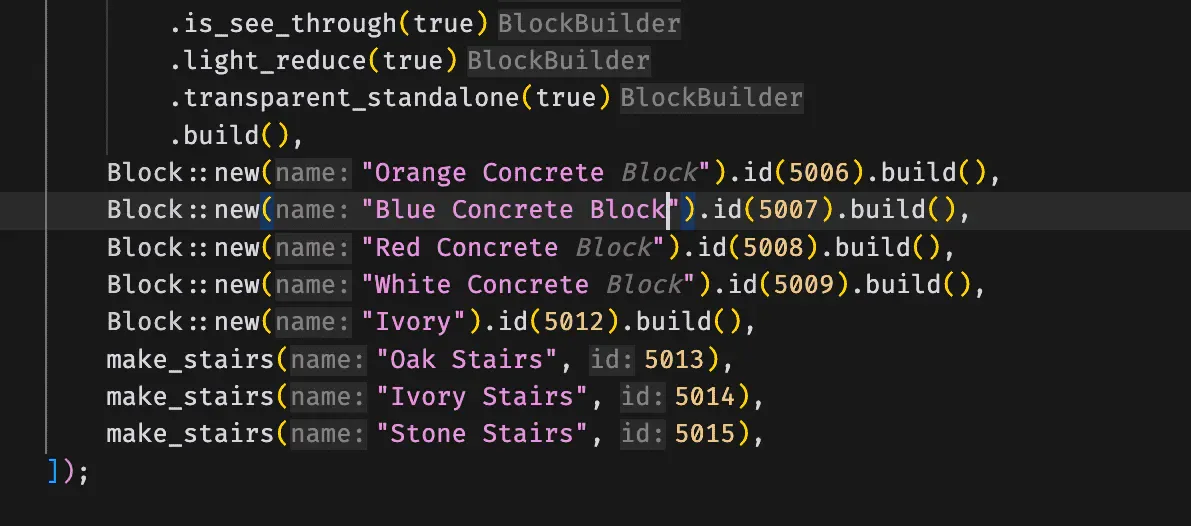
Smart rewrites: type carelessly, the AI automatically fixes your code.
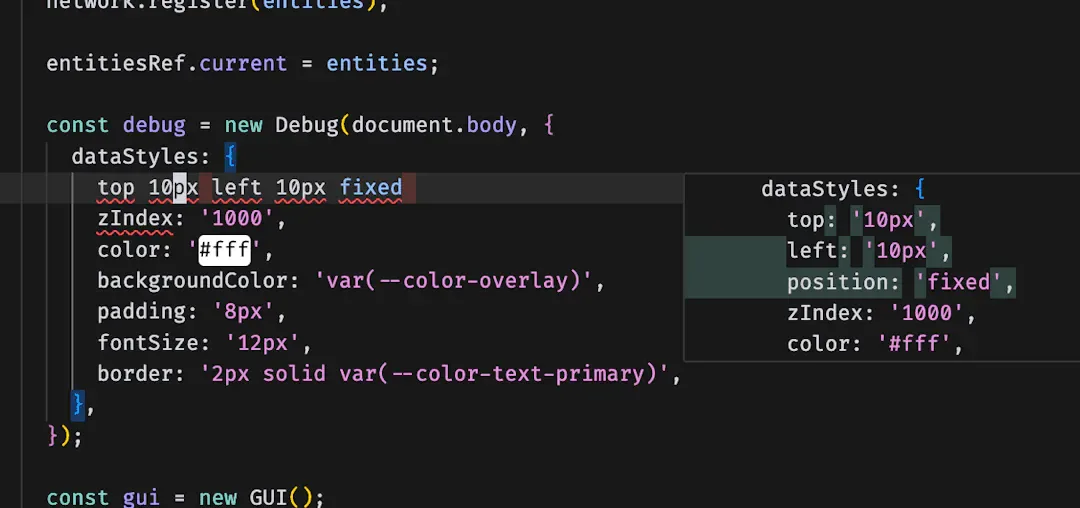
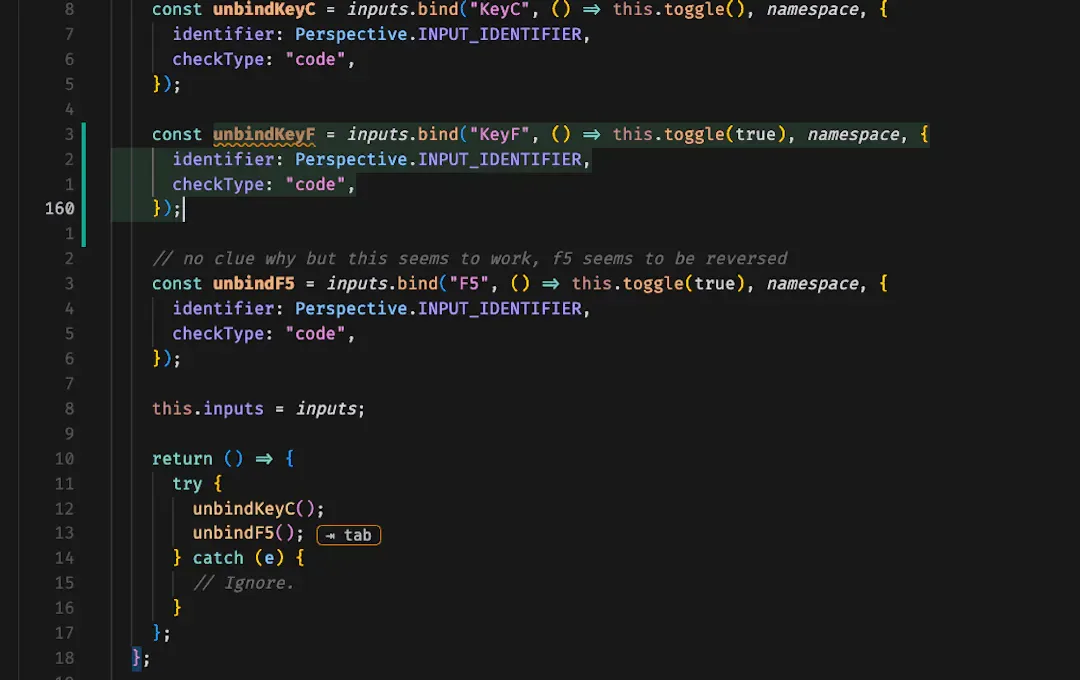
Cursor prediction: the AI predicts what your next cursor position will be, so you can directly move there. Combined with the multi-line edits, this allows for a very smooth coding experience.
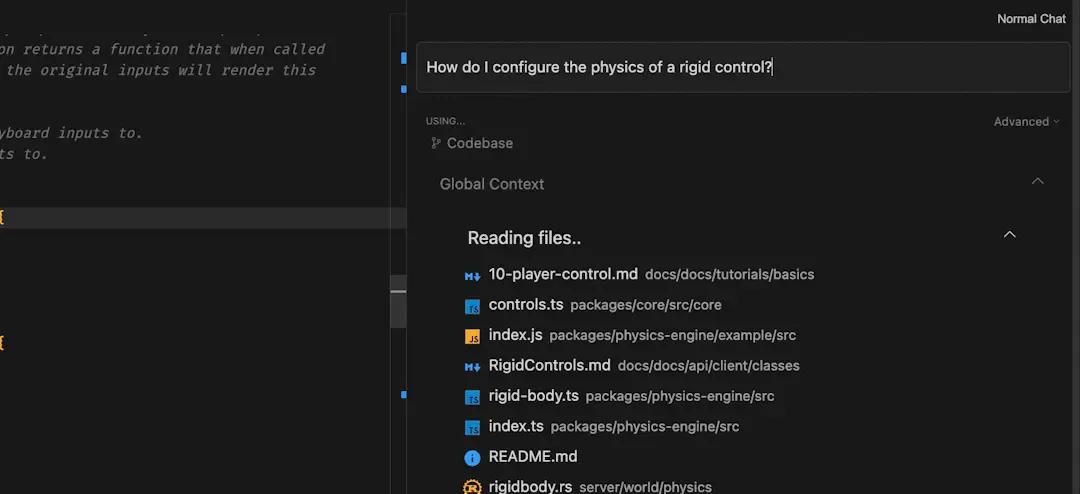
Codebase answers: while chatting, you can include your whole codebase in the context. You can also reference specific files, folders, GitHub repositories, and more.
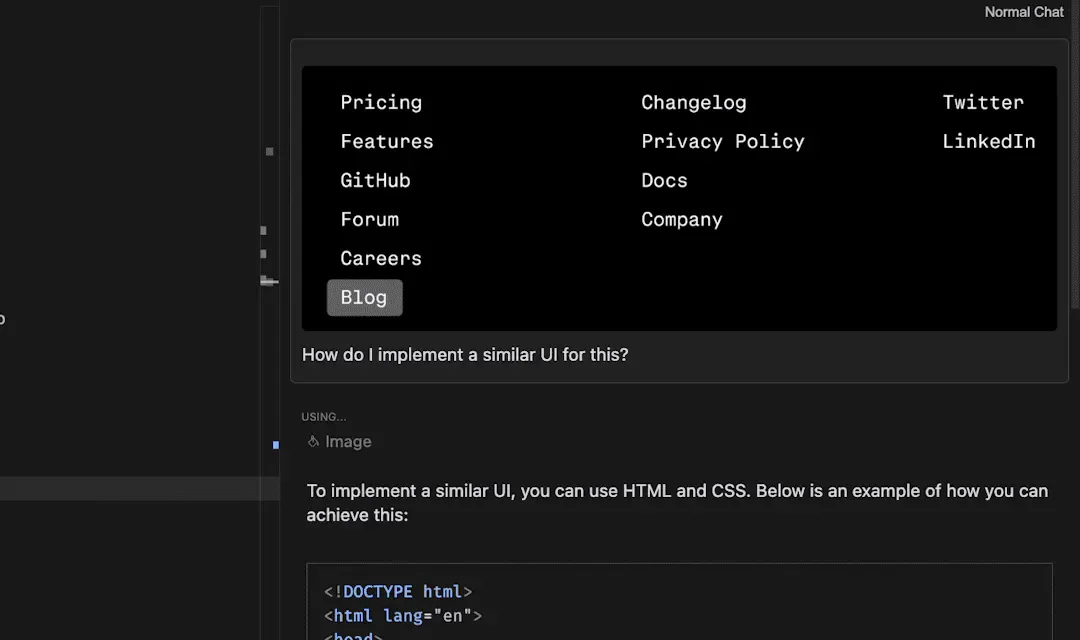
Use images: copy a screenshot of your UI or problem and paste it in the chat. The AI will understand it.
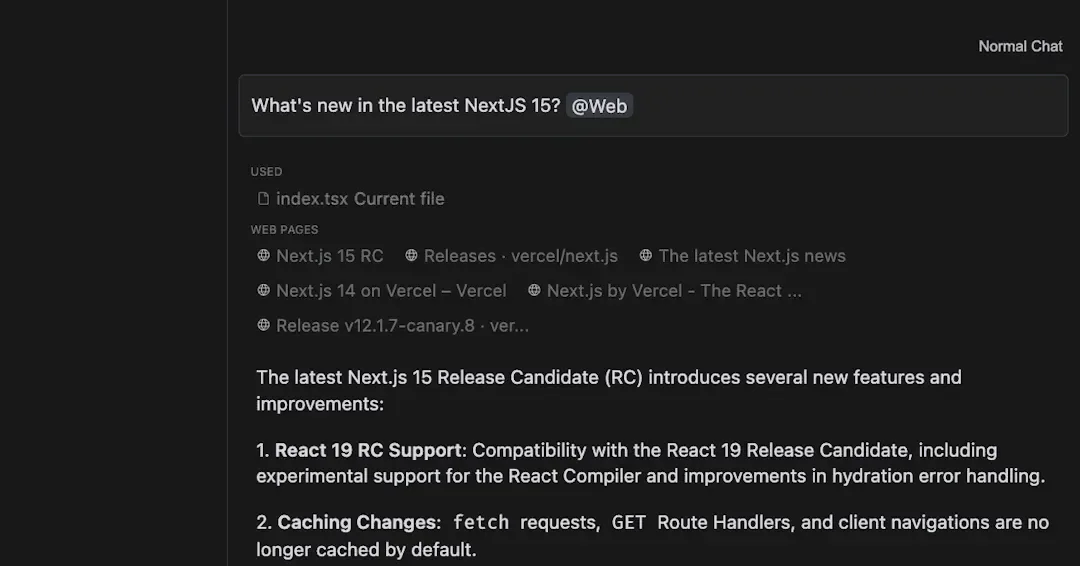
Ask the web: search the web for your question and include the top results in the context. This also works for models that can’t search the web by themselves.
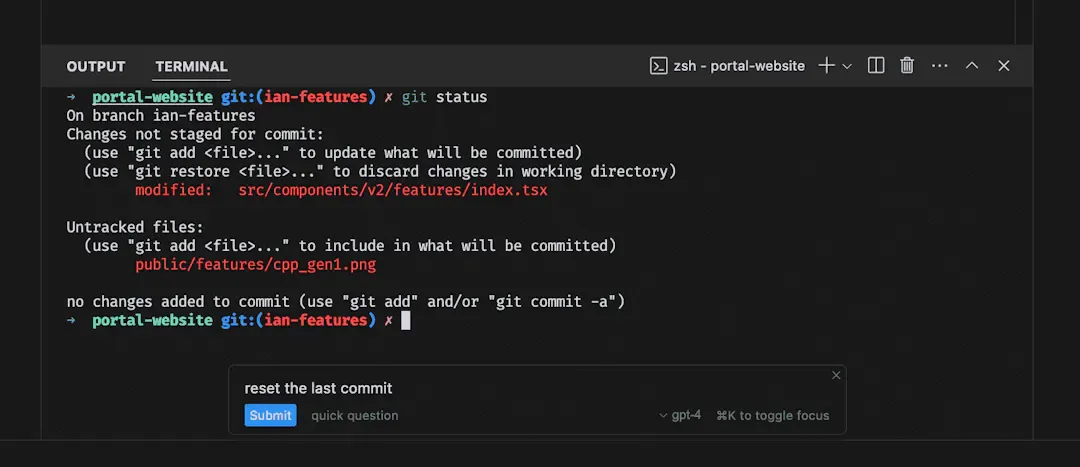
Terminal: generate terminal commands using natural language input. Select text in the terminal to add it to the chat for troubleshooting or further analysis.
Code review: the LLM can review the pending changes before you commit them to your Git repository.
Since I’m writing this article as a Markdown file in Cursor, let me give you an example of how some features described above just helped me format that feature list:
- I put the first feature name in bold, then Cursor automatically understood that I wanted to do the same for the other feature names. I hit the
Tabkey to accept the suggestions, and Cursor made them all bold. - The colon after the feature name was bold as well, but I didn’t want that: I pressed
Ctrl+Kand typed: “the colon should be outside the bold text”. Cursor presented me with a diff where all the colons were moved outside the bold text. I hitCtrl+Enterto apply all the changes automatically.
I won’t list all the features of Cursor here, but this shows how a deep integration between the IDE and LLMs can lead to a frictionless programming experience. Cursor allows you to select from a list of LLMs, like GPT-4o and Claude 3.5 Sonnet, for chatting about your code and refactoring it. At the time of writing, Claude 3.5 Sonnet is my favorite LLM for programming, beating GPT-4o in most benchmarks. For its auto-complete and cursor jumping features, Cursor uses a custom model named Cursor Tab. It monitors what you are typing, predicts what you want to do next, and proposes multiple edits at once. It is a lot more effective than what I remember from using GitHub Copilot’s auto-complete feature.
Benefits of AI for developers
AI tools are changing the game for developers, offering a wide range of benefits that are reshaping how we write code and solve problems. Let’s take a look at some key advantages these smart assistants bring to the table:
- Increased productivity:
- Faster code generation through auto-completion and suggestions
- Reduced time spent on repetitive tasks such as moving code, adding comments, generating documentation, writing unit tests, and refactoring
- Generation of boilerplate code for new project setups
- Quick access to solutions
- Assistance in debugging complex issues
- Access to a vast knowledge base for troubleshooting
- Enhanced learning:
- Exposure to new coding patterns and best practices
- Instant access to explanations and examples
- Assistance in understanding unfamiliar codebases, languages, and frameworks
- Suggestions for relevant libraries and tools
- Improved code quality:
- Suggestions for optimizations and refactoring
- Consistent style enforcement
- Automated bug detection and fixes
- Collaborative development:
- Assistance with brainstorming and prototyping
- Facilitation of knowledge sharing within teams
- AI-powered code review suggestions
- Accessibility:
- Lowering barriers for newcomers to enter the field
- Providing additional support for developers with disabilities
By leveraging these benefits, we can not only boost our productivity, but also continuously improve our skills and tackle more challenging projects. However, it’s important to use AI tools carefully, maintaining a balance between AI assistance and human expertise. Caution is particularly essential for those new to software development; while AI can be a powerful aid, it’s not a substitute for fundamental knowledge and experience. Aspiring entrepreneurs should be wary of over-relying on AI when creating a software start-up. Human intelligence and experience are still necessary for anything besides a simple prototype. LLMs are getting better at programming, and software developers might become obsolete if (when?) we create an Artificial General Intelligence (AGI) with common sense, creativity, and reasoning abilities that surpass human intelligence. Thankfully for us developers, we are not there yet.
Downsides
While AI offers many benefits, it’s important to be aware of potential drawbacks:
- Over-reliance:
- Risk of developers becoming too dependent on AI suggestions
- Potential hindrance to critical thinking and problem-solving skills
- Code quality concerns:
- AI-generated code may not always adhere to best practices or project-specific conventions
- Potential for errors or inefficiencies, requiring careful review and potential refactoring
- Security risks:
- Possibility of AI suggesting outdated or insecure code patterns
- Risk of introducing vulnerabilities if not trained on up-to-date security practices
- Privacy issues:
- Sending code snippets or projects to cloud-based AI services raises intellectual property concerns
- Potential exposure of sensitive information or trade secrets
- Inconsistent results:
- AI suggestions can vary based on context or phrasing
- May lead to inconsistencies in the codebase if not carefully managed
- Licensing and legal concerns:
- Uncertainty around ownership of AI-generated code
- Potential conflicts with open-source licenses
- Bias and limitations:
- AI models may perpetuate biases present in training data
- May struggle with novel problems outside their training scope
- False confidence:
- AI models can sometimes “hallucinate”, generating plausible-looking code referencing classes and functions that don’t exist, leading you the wrong way
- Particularly risky for less experienced developers
- Job market impact:
- AI tools may reduce demand for entry-level programming tasks, potentially limiting opportunities for junior developers
- There’s a risk of companies downsizing their development teams, relying more on AI and less on human developers
While these risks exist, many can be mitigated through proper education and careful use. We should view AI tools as powerful aids that complement, rather than replace, our skills and judgment. To address privacy and security concerns, some AI companies provide a privacy mode in which the data is not stored by the company and not used for training their models. Some products like Tabnine are only trained on code from permissive sources, reducing intellectual property concerns.
Future trends
With the power of the modern LLMs, and so many companies racing to include AI into their products, the number of possibilities is huge. I expect that we will also see the launch of new AI products that will surprise us and change the way we create software.
The first thing that comes to my mind is OpenAI’s presentation of GPT-4o’s (o for “omni” because it’s multi-modal) voice mode, showcasing the ability of the model to listen, talk, and see like a human, even with some emotion in its voice. In one of their videos, OpenAI combined this tech with a desktop app where the model could see and understand the screen in real time, converse like a person, and control the IDE. It would be nice to have such a knowledgeable pair-programmer by our side at all times. This desktop app is available for macOS, but not for Windows yet, so I haven’t had a chance to try it. I’m eagerly awaiting the Windows release later this year (2024).

Cursor, the IDE that I mentioned earlier, has already deeply integrated AI to provide a smooth experience, albeit without the voice mode of OpenAI. In my experience, this is the app that does it the best, and I’m eager to see what they will add or improve next to boost the developer experience.
JetBrains is another company that is incorporating AI into their IDEs, and as much as I prefer JetBrains Rider to Visual Studio, I was not impressed with the chat model they used. They don’t disclose which LLM the JetBrains AI is based on, or if they created their own. I liked the Git commit summarization feature, though; it was good at understanding my changes and providing a good commit message.
Another product from GitHub is GitHub Workspace, currently in technical preview. It’s an AI-native web-based development environment where you can tell the AI what you want, accept its plan, generate a pull request with the AI’s changes, and run the code. I haven’t had the chance to try it yet, but if it delivers on its promises, it might just be the way to go for smaller projects and companies. I have a hard time imagining this tool being used on massive projects at big companies, but time will tell.
Conclusion
AI-powered tools are revolutionizing the way we code, offering unprecedented productivity boosts and learning opportunities. From intelligent code completion to AI-assisted problem-solving, these technologies are becoming indispensable assets in a developer’s toolkit. However, it’s important to approach AI with a balanced perspective, recognizing its great potential, limitations, and risks. As we’ve seen, the benefits of AI in coding are substantial, but so are the potential pitfalls. We must strive to use AI as a complement to our abilities rather than a replacement for fundamental knowledge and critical thinking. The future of coding with AI is bright, promising even more seamless integration and powerful capabilities.
As these technologies continue to evolve, staying informed and adaptable will be key. Whether you’re a seasoned developer or just starting your journey, embracing AI tools wisely can significantly enhance your coding experience and career prospects. The AI revolution in coding is here, and it’s up to us to harness its power responsibly and effectively.